Script Writing 101

Quick Tip!
Schedule meetings and conversations with team members on the project to ensure that the script maintains relevancy and clarity.
Helpful Staff for this Topic

The Digital Corps produces video content for a variety of reasons – whether it be for client videos or internal promotional. Regardless of the reason, the Corps uses scripts to clearly plan out the content in a video.
Normally, Video Team or Communication Team students will be script writers. After the script is written, the content is handed off to a Video Team or Design Team member for storyboarding to plan the visual appearance of the video. Help expedite the storyboard process by writing clear, easy-to-understand scripts using the following suggestions.
Start with the idea
Script writers should work closely with their project team to understand the following elements of the script before writing anything.
- Characters and talent – What Digital Corps students are involved as characters in the video?
- Location – Where is the video shoot taking place? Is it in the office? On campus? Where?
- Story/plot/content – What is the main story the team wants to convey? This normally depends on if the video is for a client or for internal/social media usage.
- Graphic elements or special production elements – Script writers will incorporate these visual elements into their script for clarification sake. Determine what these elements are ahead of time.
- Length of video – How long does the video need to be? Are there duration limits to maintain engagement on social media?
- Purpose of the video – This is normally determined by the client. Otherwise, the video may be to promote the Digital Corps via social media.
Pick the format
Next, script writers must determine the format in which the video script will be written. There are two basic formats for script writing at the Corps: traditional screenwriting and audio visual (AV). While most major video production studios use traditional screenwriting, the Corps usually uses AV scripts to make the visual elements easier to read and understand.
Audio Visual
Audio Visual (AV) scripts are excellent for videos that need to incorporate more visual elements. The script format includes a column for “audio” and a column for “video” elements. The audio column includes everything the audience would hear – dialogue, sound effects, background noise, etc. The video side includes everything the audience would see – scene headings, parenthetical, actions lines, graphics, etc.
AV scripts allow you to line up the video’s video and audio elements. When your script is finished, make sure you line up the text in the video and audio columns to show what events are happening simultaneously. For example, if a graphic pops onscreen at the start of a new sentence, break up the text, and line up the graphic’s cue on the video side with the sentence that it will appear during.
Traditional
The traditional script format (commonly referred to as ‘screenwriting’), incorporates a variety of elements to delineate different aspects of the script. A traditional script format is useful for videos that call for more auditory elements, as it is more cumbersome to describe visual elements without taking up a ton of space. Use the following elements to separate different parts of a script, thus making it easier to read.
Scene Headings
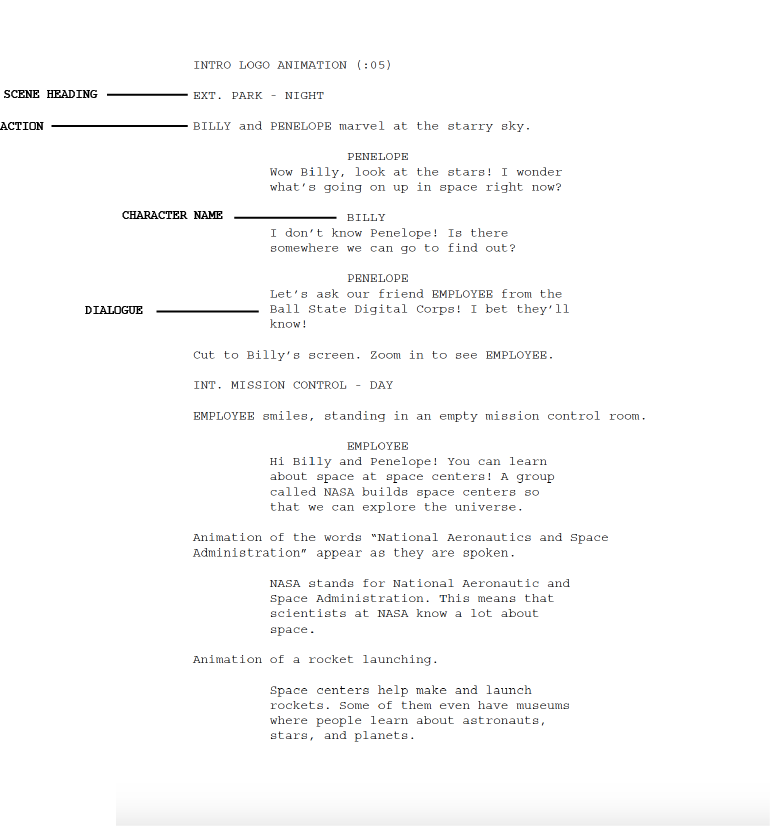
A scene heading informs the reader of where and when the scene takes place. Write scene headings in capital letters and indicate inside/outside and day/night. The formats are interior (INT.) or exterior (EXT.) and DAY or NIGHT. An example can be seen below.
Scene Heading Example: INT. OFFICE – DAY.
Action
This is a concise description of what is seen and heard. The Action element is written in plain text, with no special formatting. However, it is best practice to keep the language concise and to the point. See the script sample below for an example.
Character Name
The name of the character speaking or involved with the scene. These are displayed in all capital letters above their dialogue. See the sample script below for an example.
Dialogue
Dialogue refers to what the characters actually say. This element of the script is centered on the page and appears below the character name. If characters speak at the same time, these are displayed as two side-by-side columns. See the sample script below for an example.
Transitions
Transitions help script writers move from one scene to the next. A common transition is CUT TO. In scriptwriting, one may choose to include a more descriptive transition, but sometimes the editor makes the executive decision to change the format.
Parentheticals
Depending on the scene, script writers may need to provide context or instruction for the dialogue delivery. For example, they may need clarify a sarcastic tone by including (sarcastic) before the dialogue. Use these sparingly!
To write the script, the Digital Corps will often use Celtx, a scriptwriting application accessible on all Digital Corps laptops. Otherwise, script writers are encouraged to format a Word Document based on the Microsoft Word Template below.

Check out these templates:
-
Word Screenplay Template:
https://templates.office.com/en-us/screenplay-tm02805802
For more on screenwriting for film, check out the master screenplay format.
Check out these templates:
The Writing Process
The script writing process can be time consuming. Follow these suggestions along with the proper script format to expedite the process and reduce the amount of reviews a script needs to undergo.
Outline the script
Outline the script by ordering the flow of events in the story chronologically. This outline is helpful for script writers as a reference point once they are ready to begin the actual writing. Some outlines are determined in project meetings as opposed to being completed individually, depending on the project.
Write the script
It’s time to actually write the script! Remember, script writing is all about communicating to the people on set, so maintain clarity. Keep older drafts of scripts available in the PROJECT NAME > Assets > Comm > Scripts folder on OneDrive for reference in the future. Script writers may swap out old elements from previous script versions into new and final versions.
Read the script out loud and edit
Remember, when writing scripts, you are writing for the ear, not the eyes. Hence, it is best practice at the Digital Corps for script writers to read their scripts out loud after they are written to catch errors in voice, flow, and grammar. By doing so, they recognize problems in the script that are not otherwise apparent. This step of the script writing process will help ensure the script aligns with the original goal for the video.
Time it
After reading the script out loud to catch errors in voice, flow, and grammar, script writers will read the script out once more to measure the duration of the script itself. Generally, a script is timed to last about one minute per page, but if there are many actions or parantheticals, scripts can be longer or shorter.
By reading the script out loud once more, writers keep the script in the time range that the project team determined.
Submit the draft for review
The review process is really helpful for script writers. Additional input and review will ensure errors are caught and the script clearly communicates the intended message.
- JPM
- PM
- Communication Team Lead
- Brandon
