Reviewing UX Content As A JPM

Quick Tip!
The User Experience Team works collaboratively with all other teams. Their deliverables rarely exist in a void. More often than nought, they are evaluating someone else’s work.
If you are unsure of how to review UX documents, this is the article for you.
Helpful Staff for this Topic

This is the common review process for most UX submissions:
- JPM
- PM
- UX Team Lead
- Brandon
As a new JPM, it can be difficult to know what to evaluate when looking at UX content. UX terminology and methods may seem unclear if you are unfamiliar with the discipline. At first glance, you may question the difference between a “Usability Testing Plan” and a “Quality Assurance Testing Plan.” Along with reports, these documents identify issues in navigation and design, as well problems or concerns with the functionality.
The first step to review any UX document is to understand its purpose.
Usability Testing Plans
The purpose of a Usability Testing Plan is to clearly describe three things:
- testing methods
- procedures
- overall project goals
Although methods and procedures are closely related, they are two distinct sections of a plan. The methods section should describe, in a sense, what ‘tools’ will be used. The UX team is trained on a variety of user tests, each of which has its own unique structure and purpose. Some of their most commonly applied methods include usability testing, system audits, and quality assurance testing.
Quick Tip!
To see a comprehensive list of the mostly frequently used UX methods, check out this article by the Nielsen Norman group.
By comparison, the procedures section should describe how that tool will be implemented. This section is written using a step-by-step format to describe the exact process that a UX team member will follow when conducting testing.
A good rule of thumb when reviewing the procedures section is to walk through the testing process using only the testing plan as a guide. By following best practices and lessons learned in training, the UX team member should have provided sufficient details so that a complete stranger could accurately recreate the study.
As you review a testing plan, ask yourself the following questions:
- Are the project goals accurately described?
- Do the testing goals correlate to the project goals?
- Are the methods defined in a clear and concise manner?
- Has the procedure been explained in enough detail?
- Are the next steps or deliverables clearly defined?
The inclusion of the overall project goals may seem unnecessary. After all, as the JPM, you have a thorough understanding of the project. However, the value of user experience testing is lost if the UX Team does not have this same understanding. If the purpose and goals of a project are misunderstood, the testing plan will not provide relevant recommendations.
Usability Testing Reports
Testing reports are appended to the original testing plan document. Because of this, much of the material has already been reviewed.
For reports, pay close attention to the following sections:
- Any measures unique to the method used (e.g. system usability scale, lostness index, etc.)
- Problem Statements
- Recommendations / Conclusion
Unique Measures
Measures and metrics often differ depending on the testing method used, so the best way to know what to evaluate will be to ask the UX team lead. Schedule time to walk through the report with the UX team lead to determine how this will affect timeline and tasks.
Problem Statements
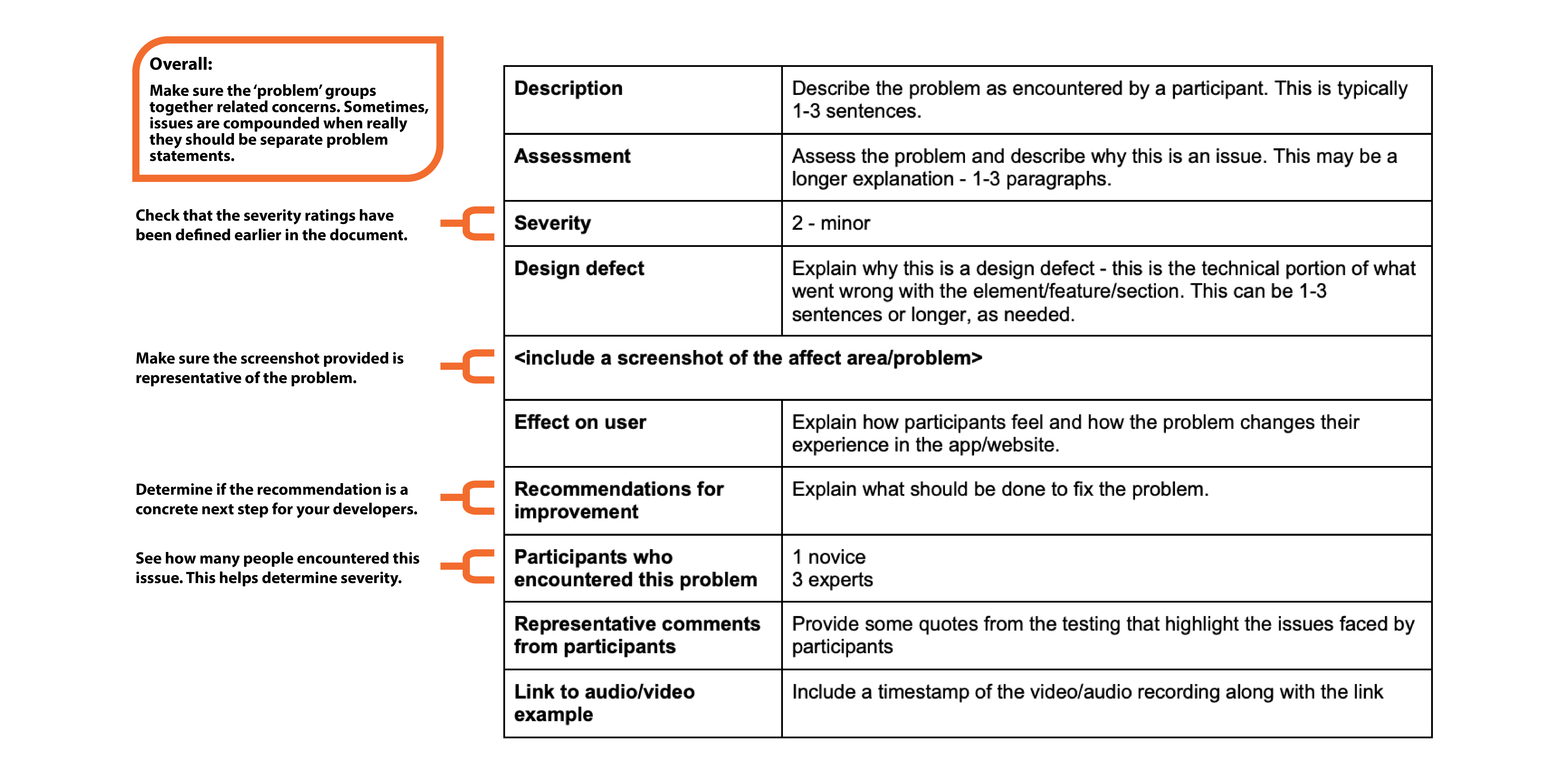
Problem statements are formatted in tables, with one per page. These statements are a summary of issues identified during the testing process. As you evaluate these, make sure that you understand the problem described and verify there is enough evidence to support it.
Here is an example problem statement, which has been marked to indicate what to evaluate:
Recommendations / Conclusion
Problem statements are for the developers – they are formatted so a developer could pull out a single page of the report and that becomes a task and point of reference. Recommendations are for management – this is a single page that summarizes the entirety of testing, including any system-wide concerns.
When reading the conclusion, verify that all majors concerns found during testing are reported clearly and concisely. You need to make sure the UX team member provided enough context to understand the outcomes. For example, if Brandon reads it, would he understand the problems described?
Quick Tip!
For more information on UX testing, check out this article on “User Testing 101”.
Quality Assurance Documents
Quality assurance (QA) plans and reports can either be their own documents, or they can be included in a usability plan or report. The UX team typically conducts QA testing on a system, but may not always conduct usability testing.
The QA plan and results take the form of a spreadsheet. In the plan, all parts/sections of the system are defined in detail. If you are reviewing a QA plan, verify that all elements of the system are represented. When reviewing a QA report, the most important column is Feedback/Recommendations. This is found on the far right of the spreadsheet.
Recommendations listed in this column should be clear and direct to provide next steps for your developers. After you review the report, schedule a meeting with staff and the UX team member to discuss which issues can be addressed given your timeline and team workload.
NOTE: Not all recommendations will become tasks so this review meeting is important. Do not add tasks to Basecamp until the QA results are discussed with the project team.
Additional UX Content
Although testing plans and reports are the most common documents to review, other documents may be used as part of the project.
Here are just a few:
- Competitor and System Audits
- General research reports
- Stakeholder Interviews
- Google Analytics Custom Event Tracking
- Paper Prototypes and Wireframes
- Card Sorting
If you find yourself reviewing a less common UX document, don’t hesitate to reach out to the UX team lead. They can give you tips on what to look for in the review.
Additional Articles:
This article is part of a series:
-
1
Reviewing Design Content as a JPM

-
2
Reviewing Video Content as a JPM
-
3
Reviewing UX Content As A JPM