UX Methods: Planning

Quick Tip!
Our UX team has many different skills that could be helpful for a project. If you aren’t sure how to engage the UX team into the project, talk to the team lead to see which UX methods could be helpful for a particular project.
In the beginning stages of projects at the Digital Corps, planning helps set up the team for success. The UX team provides context for users and problems to guide the team in creating a user-centered product. The UX team works hand-in-hand with all teams to ensure the best methods are implemented for a successful planning stage.
UX Methods for Planning
Problem Statements and Definition
The problem statement and definition is typically done for client presentations at the beginning of a project. This method includes defining the problem, stakeholders, constraints, and large milestones. In design thinking, it is common for problem statements to be in the form of “How Might We” questions. These help the team think of the problem space as a question to answer, not just a prescribed solution. Creating a problem statement and definition takes 3-7 days, depending on the project.
Stakeholder Interviews
At the Digital Corps, stakeholder interviews are more commonly known as client intakes. In stakeholder interviews, the team asks clients or project stakeholders questions to better understand the needs of the problem space. Beyond the client intake meeting, the UX team can interview clients and other stakeholders, such as users or other affected individuals about the problem space or areas of concern. The timeline for this task depends on how in depth or how many interviews the team conducts. It should take about one week to synthesize data after the interview is conducted.
Research
It is common for teams to be unfamiliar with the problem space or its software solutions. In this case, the UX team conducts research on user and technical needs for the solution being designed. There are two types of research that the UX team conducts: primary and secondary. At the Corps, the UX team conducts mostly secondary research, but when a timeline allows, primary research can be beneficial for user-centered design.
Primary Research
For primary research, the UX team conducts their own research methods on the problem space. This can involve interviews, observation, and surveys. Other methods can be used to conduct this research, such as card sorting. Card sorting allows the researcher to observe and understand how users naturally divide topics and sections. Other methods can involve activities or focus groups with users or stakeholders.
Secondary Research
Secondary research involves finding similar research or case studies on a particular topic or project. Oftentimes, these research sources involve usability studies, examples of other successful projects, or technical requirements involved for the project. For example, the UX team researching designing infrared touch screens for the Touch Wall and Table project. The amount of time needed for research depends on project needs and the extent of the research.
Site Maps
A site map is a visual layout of all of the pages of a project. This is typically helpful in projects with website or application solutions, but could be used for laying out the structure of a product. This method is typically done at the beginning of a project after the structure is decided. A site map can help various teams understand site navigation and how pages are connected. However, site maps do not show the interactions to get from one page to another, just the way the pages connect. At the Corps, this is common to do before wireframe design, as it helps designers and developers understand the project pages needed. Depending on the complexity of the system or how structured the site is, site map creation takes around 3-5 days.
User Flows
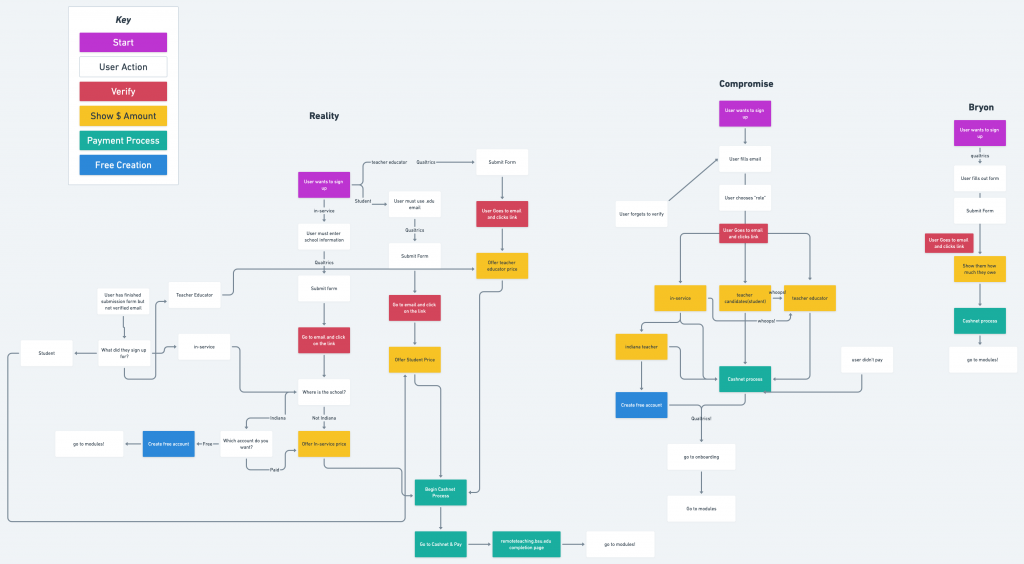
A user flow is a more in-depth view of how a user would navigate through a site or application. It shows pages, interactions, and decisions made by a user. This can be done for one or multiple types of users. A user flow shows the complete interaction with the product from start to finish, and the motivations behind each choice. The Digital Corps used a user flow to show the flow of the Remote Teaching site registration. This user flow displays different possible user flows for integrating the registration system and how a user would navigate through. A user flow typically takes 5-7 days, depending on the amount of user research needed to create the flow.
Task Flows
A task flow is a more zoomed in version of a user flow: it displays how a user would complete a particular task on the product. It is optional to display motivations and decisions, but is essential to display interactions and pages in a task flow. Task flows are not commonly done at the Digital Corps, but may be helpful for updating old projects or guiding usability testing. Task flows can take anywhere from 2-7 days depending on how many tasks need to be documented.
Transitioning into the Execute Phase
When a project begins executing a design or product, there are a few UX methods that may help guide the team moving forward. These methods are done throughout the planning phase, but can provide insights during this transition.
Personas
Personas are used to define a specific type of user, along with their goals, needs, and pain points. Depending on the complexity of the project or personas, they can more specifically focus on a demographic or the technological capabilities of a possible user. Personas can be used by a whole project team to bring everyone on the same page when implementing features. A persona can provide context to decision making done throughout the rest of the project, specifically in the execution phase. Personas take about one week, but the timeline depends on the complexity and number of personas.
Focus Groups
Focus groups are a favorite at the Digital Corps for brainstorming and gaining insight from potential users. Focus groups are used to ideate potential solutions if a team is unable to make a decision. There are multiple methods of brainstorming that can be used in a focus group, such as Six Hats, SCAMPER, or Saturate and Group. When ideating, be careful when asking participants to come up with a solution, as they might not understand the bigger picture when suggesting an end product. The timeline for a focus group depends on scheduling and the size of focus groups, but data collection can typically occur within a week of the focus group being conducted.
