Reviewing Development Content as a JPM

Quick Tip!
Development work can be difficult to review when you do not have a background in code. As a JPM, the way you review Dev Team content will be very different from the other teams.
Read on to see how you can still provide meaningful feedback to your developers.
Helpful Staff for this Topic

Overall Considerations
Dev Team submissions are quite different from the other teams at the Digital Corps. Because of the technical nature of development work, it is difficult to review if you are not a developer.
Consider the following whenever you get a Dev Team submission:
- There are far fewer things to review and they are much more labor-intensive than the typical review process.
- Peer review is critical, so you will need to manage and track it (to ensure that it is happening).
- In a system (e.g. a website or app), everything is interconnected. Changes to one thing may lead to unexpected consequences in a different area of the system.
Common Deliverables
Component Lists
Developers can start this list when the lo-fi designs of the system are approved. Essentially, the developers will walk through these designs and identify repeated elements (called components) that could be reused in code.
This is process is important because, if done correctly, saves your developers time later on down the line.
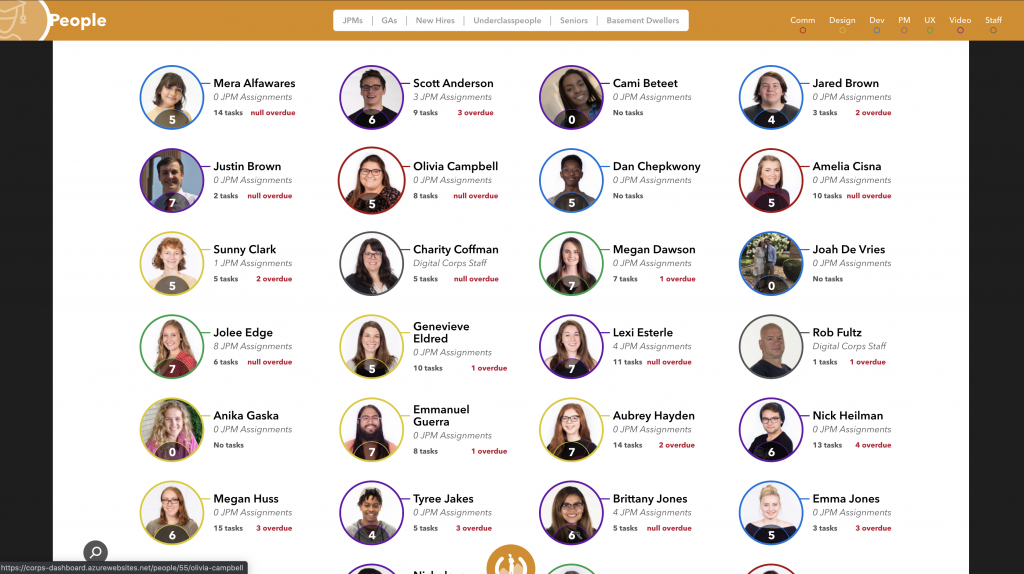
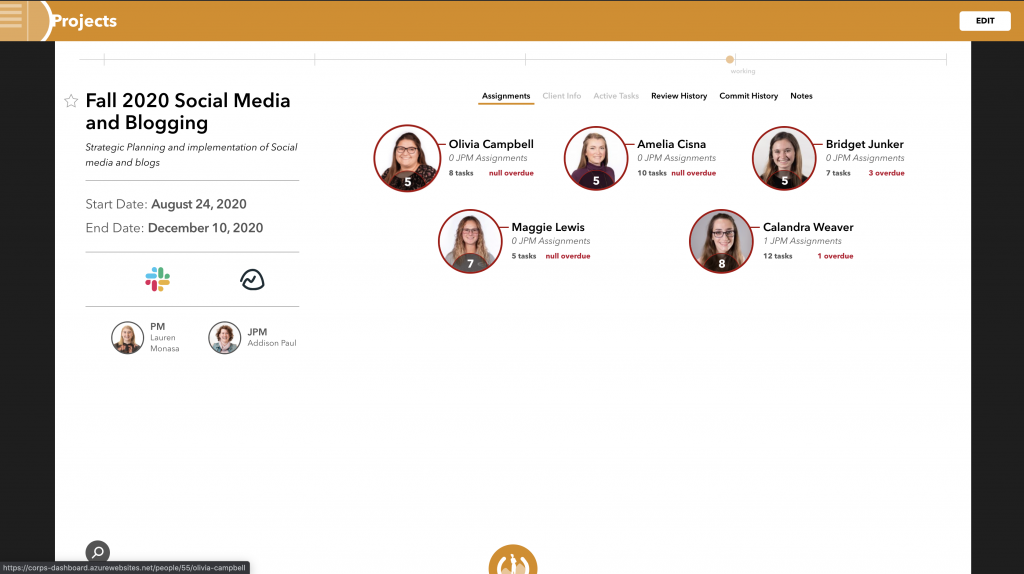
When you review a component list, you should have the mockups pulled up alongside the list and ask yourself the following:
- Did the developer account for every instance of this component? (Did they miss one?)
- Would this instance work as a component or does it warrant a custom solution?
In the example below, here are some possible components:
- search icon / functionality
- the primary navigation (the Digital Corps Logo)
- a “people” component (whenever there is a student’s photo with their name and info by it)
Website Review
Although the end user might see a website as a collection of separate pages, these pages are often closely tied together. When reviewing a website, fixing a bug on one page might break another.
Because of this, developers cannot submit individual pages of a website for review, especially on a website with a lot of interaction elements (e.g. progress tracking, messaging, submitting forms).
Instead, you’ll need to work with your developers to determine when the whole website is ready for review.
Steps to Review a Website
- Try to break it!
- Give detailed feedback.
- Record feedback in Basecamp.
“Breaking” the Website
Here are a few examples of the kind of behaviors you’ll need to do:
- Click every link
- Refresh in the middle of an interaction
- Put strange characters in a form
- Use the ‘back button’ in your browser
Most importantly, be thorough! Look in every crack and crevice of the site to see if the developers have accounted for every possibility.
If time allows, check in every major browser (Chrome, Firefox, Safari, Edge).
Giving Detailed Feedback
Whenever you find an issue with the site, you need to record the following information:
- A link to the affected page
- A screenshot of the issue (if it is visual)
- A screenshot of the console log
- A brief description of what happened versus what was expected to happen
Quick Tip!
To take a screenshot on your MacBook:
- For the whole screen, hold down Shift, Command, and 3
- For part of the screen, hold down Shift, Command, and 4 and then select the area of the screenshot with your cursor
To access the console on your browser:
- hold command, option, and i
- OR right-click and select “Open Inspector” and navigate to the console tab
Recording Feedback in Basecamp
Gather all of the information you recorded for an issue and add it as a task in Basecamp. You can either assign a specific developer or let the team divide the tasks amongst themselves.
If you run into a lot of issues, read the article: “Using Basecamp for Quality Assurance Reporting” to learn how to organize bug lists in Basecamp.
Wait, There’s More‽
Maybe. Talk with staff and your PM to determine if there are any other development deliverables that you would need to review. Again, the Dev process is different from other teams, so be flexible!
