Note Taking Best Practices

Quick Tip!
Before every project meeting, the JPM and PM create an agenda and take the project’s official meeting notes.
As a member of the project team, you are expected to take your own, personal notes regarding your individual responsibilities for a project.
Helpful Staff for this Topic

Who Should Read This Article?
This article is meant for any Corps employee working on projects. It will cover the Microsoft OneNote file structure, the importance of note-taking, and tips on the kind of information that should be recorded.
If you are a JPM or PM looking to write agendas, you should go to the Creating Agendas with OneNote article. You should also share THIS article with your team during each project’s kick-off and encourage your team to take their own notes!
OneNote File Structure
You will find the meeting notes document via the following file path:
Digital Corps Projects > Your Project Name > Documentation > Meeting Notes > OneNote File
OneNote is organized with three layers: 1) the notebook, 2) a section within the notebook, and 3) a page within the section of the notebook.
Here is how meeting notes are structured:
- Notebook = Project Name
- Section = Each Note-taker
- Page = Each Meeting
A typical project has one notebook and within that notebook, each person has their own section for notes. The JPM records the meeting’s official notes, which are labeled with the date that meeting occurred.
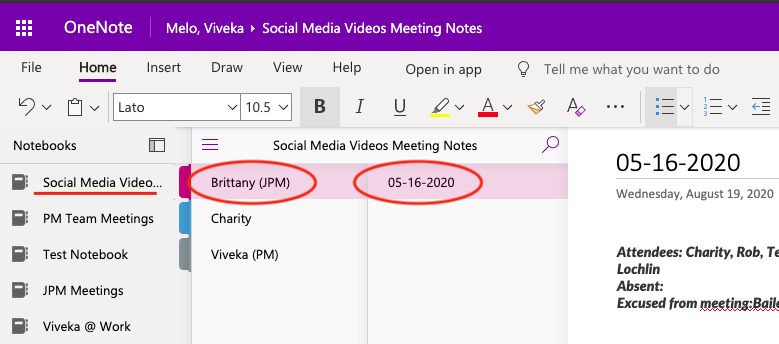
To take your own personal notes, simply create a new section in the project’s notebook with your name as the title. From there, you can organize your pages however you’d like.
Importance of Note-Taking
The primary purpose of note-taking is to avoid miscommunication. At the Corps, there are multiples sources of information where you can verify your tasks:
- Basecamp
- Official Meeting Notes
- The Project’s Slack Channel
Sometimes, these sources can get muddled and your tasks may be unclear. The best way to avoid this is to take your own personal notes during each meeting you attend, including weekly project meetings and breakout meetings.
By taking your own notes, you also force yourself to stay engaged in the meeting, which can only be a good thing.
For example, imagine a Basecamp task has a different due date than what was discussed in the project channel. You can clear up this confusion by referencing your personal notes and identify the correct due date.
Note-Taking Tips: What Information is Worth Recording?
Meetings often have multiple objectives and as a team member, it is NOT your job to record notes for the whole meeting. Here are some key elements that you should keep track of:
- your expected due dates
- review process (especially if it differs from the normal process)
- client feedback/revisions regarding your work
- break-out meetings (JPMs are humans, if they forget to schedule a break-out, you can help remind them!)
- who you can work with / who to ask questions to if you experience roadblocks
Note Formatting Tips
Use formatting to help make your notes readable. Bold due dates. Use bulleted lists for large amounts of feedback. Get creative and make your notes your own. Some people even put hyperlinks in their notes for documents that they need to reference often.
OneNote also has a variety of stickers, tags, and drawing features that you can use. Here is their documentation on the ‘tags’ systems, which can be super helpful if you’re keeping track of a lot of tasks.
By personalizing your notes, you make them easier to use later!
Quick Tip!
Key Takeaway: No one likes miscommunication. It is frustrating, confusing, and unproductive.
One great way you can prevent miscommunication is to take your own, detailed notes whenever possible.
