Touch Wall and Table Case Study

Quick Tip!
When designing for unique experiences, it is important to keep accessibility and interaction design in mind.
Helpful Staff for this Topic

Students at the Digital Corps often have the opportunity to work with new and emerging technologies to solve unique and interesting challenges. During the 2019-2020 school year, Digital Corps students were given access to two new technologies: a 98″ touch-screen wall and a 55″ touch-screen table, with the prompt to conceptualize experiences for those devices.
To begin the process, teams were divided up to either work on the touch-screen wall or touch-screen table. Groups met weekly to share research findings, usability principles, and determine next steps in their research and ideation. For the first semester of these projects, the team’s overall goal was to pitch ideas with paper prototypes. This project structure varied from typical projects at the Digital Corps, as teams were not suggesting a solution, but rather exploring possibilities with these new technologies. The teams then worked together with Digital Corps staff to determine which prototypes would continue into development the following semester.
Research
Development, Design, and UX team members collaborated to come up with their ideas for the touch wall or table. Viveka Melo, a senior UX Master at the time, said her group “began with researching what touch tables and walls were currently being used for in the world.” Research found that many similar technologies were used for self-serve ordering displays in restaurants, interactive wayfinding displays, or gaming.
Many groups, including Melo’s, used this information to brainstorm the best approach to generate ideas for the touch walls and tables. Eli Sokeland, a Development Team Specialist at the Corps, said that his group began the ideation “by looking at the hardware capabilities of the touch walls and tables to see how it differed from a typical touch experience.” Sokeland also mentioned that his group found great examples of different uses from companies such as ELO Touch that manufactures the large touch screens, and from museums, such as the Indianapolis Children’s Museum, that use similar technology.
Technological Capabilities
Beyond typical uses for these technologies, Corps students gained a deeper understanding of what they could do with the wall by evaluating how the touch sensors work on the larger screen. The touch wall uses an infrared field to facilitate touch interactions. When an object (such as a hand or finger) breaks that field, then the device recognizes this as a touch interaction. This differs from typical touch-screen devices like smart phones that recognize touch through electrical conductors, such as a bare finger. Research showed that many of the typical touch interactions needed to be altered to work well on the infrared touch screens. This included making smaller touch targets larger, creating simple and limited movements, and replacing dragging with the ability to select and tap an item.
The touch table team used their research to experiment with puck interactions, and how users might use them as a tool to select content and navigate the interface. Research found that tangible interfaces (such as pucks) mixed with a digital interface can allow for more engaging user experiences. Pucks can help users understand the intended functions when mixed with digital context. Possible puck interactions included navigating content, using a puck as a dial to select items on screen, or as a larger point of touch on the screen. Groups kept these possible interactions in mind as they worked on their ideas.
Ideating
Student groups then used this research to finalize their ideas. In Melo’s group, she and former Development Team Master Seth Campbell realized they enjoyed the idea of gamification, which then lead to their idea of creating a game for the touch wall that taught people about Punnett squares. “We both liked games and wanted to find a way to make a collaborative game. We began thinking about the interactive flash games we played as kids, and ran with that idea,” Melo explained.
Sokeland’s group had a similar approach–their idea involved an interactive historical timeline of former presidents and their lives for the touch table. “We used the examples found from places like museums and wanted to create a unique experience to show off the hardware, while also creating a memorable experience for those who interacted with it.”
Prototyping
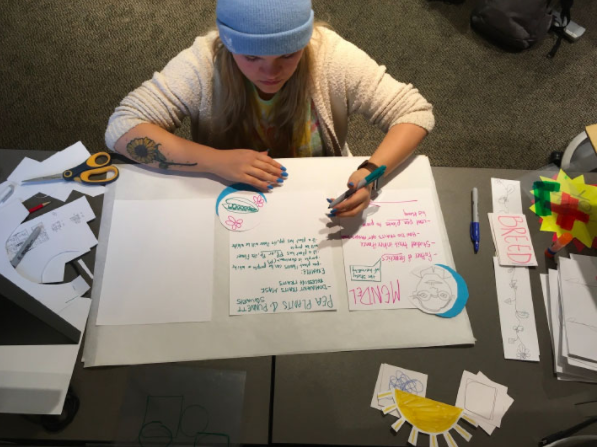
Once the groups decided on their ideas, the next step was to create and test paper prototypes for their experiences. Groups quickly realized that paper prototyping would be essential for testing user interactions with the large walls, as many people have not interacted with large touch screens like these before. “There was a lot of brainstorming on a white board before moving ideas to the actual paper prototypes,” Melo said. Sokeland and his team also ran into some problems while prototyping. “There was a lot of trial and error.”
Interactions were a large part of the prototyping phase. Melo’s group tried to have a paper element for every possible indicator or interaction. This helped them find places that they missed or hadn’t even thought of until users were interacting. Sokeland said that his group made a lot of changes as users found awkward interactions, especially with the usage of the pucks.
Quick Tip!
Interaction design is the study and design of how a user interacts with a product. This includes words, visual representations, physical objects or space, time, and behavior.
Interaction Design
One of the most important considerations throughout this entire process was interaction design. Many (if not all) of the students on the project had never designed for these devices and the unique interaction techniques used, so research and user experience design were crucial during the designing phase. One of the most important interaction design considerations was accessibility. For all people to enjoy these experiences, groups had to make sure all touch elements were in reach for participants and provided appropriate affordances, such as animating moveable pieces or adding navigation buttons towards the bottom of the screen.
Along with accessibility, interaction design helped keep the experiences from getting too cluttered. Sokeland said “when digital, it’s easy to get cluttered. Paper prototyping helped us understand what was necessary to create a balance of interaction.” In Melo’s group, they decided to include interactions on both sides of the board to encourage multiple people to play at the same time.
The type of technology used also played into the interaction design. The infrared touch screen made it difficult for users to drag items across a screen with their hands or another object. Larger touch targets were crucial for user success with this type of technology as well, as infrared touch screens do not allow for small, precise interactions. Groups combatted this issue with creating larger targets and avoiding interactions that required dragging across the screen.
Proofs of Concepts
After pitching their paper prototypes to the team and staff members, projects were chosen to move on to development. Four projects were created—two for the touch wall and two for the touch table. The touch wall games included a mix-to-create pizza building game, along with an educational puzzle game. The touch table games included an interactive timeline about dinosaurs and an artist palette.
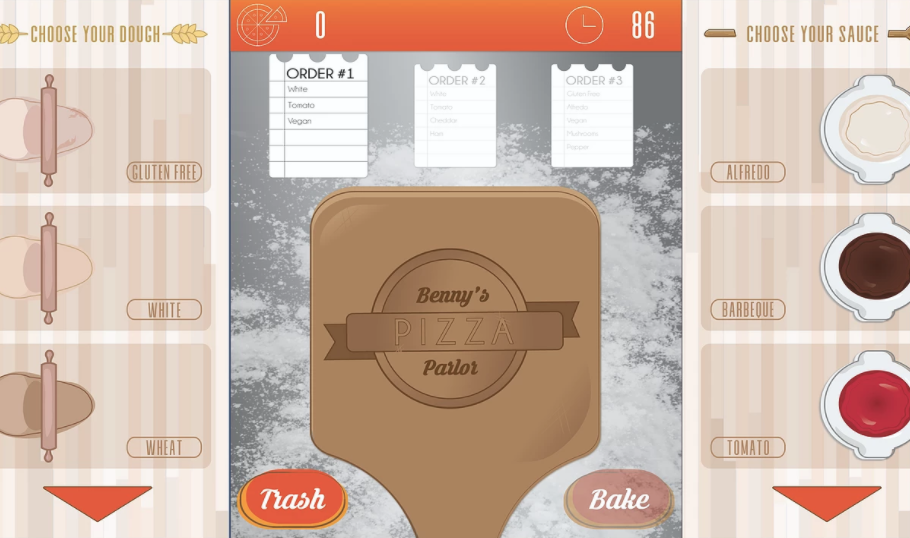
Groups of student developers, designers, and UXers worked together to design and create the final digital touch experiences. Student developers built these game experiences with Unity, a program with which many of the students did not have prior experience. UX worked closely with design to make sure all games were accessible and usable, and that all interactions were taken into consideration. These teams worked together and shared their knowledge to create these final proofs of concepts.
Testing
As students worked on their designs, user testing was crucial to determine what users could reach, and how designs would translate on the large touch-screens. Testing occurred in multiple stages and in a variety of different ways. During the initial testing, some groups tested on partial applications, while others tested on white boards with pictures of the actual interface.
Quick Tip!
Testing throughout different stages of a project will help ensure that usability issues are found along the way and are fixed as early as possible.
Idle Screen Testing
Most groups started out by testing the idle start screens, to understand how users might begin their interactions, and if they would understand how the games and experiences functioned. From this testing, many groups realized that more context was needed on their idle screens for users to understand how to begin the interaction. For the touch wall, the mix-to-create pizza game team learned that users didn’t understand they were playing a game—some thought it was a kiosk where they could order a pizza. Users struggled to understand the functionality of each button, such as the mute button.
The touch table team found during testing that users were unsure about where to place pucks on the screen and when exactly they should use them. Users struggled with placing pucks, especially when they weren’t using them. This allowed the team to reevaluate their designs and give users a designated resting spot for the pucks.
Virtual Testing
As students prepared to test these experiences on the actual touch table and wall, they were forced to put these projects on hold due to COVID-19 restrictions. Some groups were able to test their concepts virtually, over Zoom, by using click interactions instead of touch. While this testing was still helpful, students found that most of their feedback was more functionality-based over usability. Some groups gained more helpful feedback than others, as games like the puzzle touch wall game were very straightforward in the virtual environment.
Other games were still able to receive feedback on the usability through these virtual testing scenarios. For the mix-to-create wall game, users were oftentimes unaware of the order aspect of the game and began customizing their own pizza. By the time users realized the rules, the time for the game was finished. Some problems arose through the virtual testing environment, such as game sounds being too loud and smaller screen sizes, but teams plan to focus on these elements when testing in person.
Future Testing
At this time, in-person testing has not been completed. Virtual testing gave teams some focus points, such as sizing of elements and ensuring users have clear instructions, which will be added before in-person testing is conducted. Groups also hope to test how users use the pucks on the actual touch table to ensure that there is no confusion on how these elements interact with their experiences. Spatial elements, such as button and text height, along with multiplayer options will also be a focus of in-person testing. Students are still hoping to test these experiences in the future, while also continuing to keep safety a priority.
Key Takeaways
- Digital Corps students were given access to two new technologies: a 98″ touch-screen wall and a 55″ touch-screen table, with the prompt to conceptualize experiences for those devices.
- Students researched technological capabilities, interaction design, and usability principles to shape their prototypes.
- With these unique technologies, interaction design played a crucial role in finalizing the proofs of concepts.
- In the end, students were able to create four proofs of concepts: a puzzle game and mix-to-create pizza game for the touch wall, and an interactive timeline and artist palette for the touch table.
- Testing occurred in a few different rounds, including idle screen testing and virtual testing of the full products.
- Multiple rounds of testing found that users needed clear, visible instructions with unfamiliar interactions, such as pucks or dragging puzzle pieces.
- In-person testing will take place after COVID-19 restrictions are lifted. Students hope to test both the puck and touch interactions, spacial elements, and multiplayer options when able to test in-person.
