Saturate and Group

Quick Tip!
Saturate and Group is a method of brainstorming used at the Digital Corps and beyond. If you’re unsure this method is the most helpful for your research, check out other forms of brainstorming to see which method may be right for your research.
What is Saturate and Group?
Brainstorming is an important part of the collaborative process at the Digital Corps. One of the methods used to gather a wide variety of ideas and input during a session is called Saturate and Group. This method is often part of the design phase of design thinking, a solution-based problem-solving approach that seeks to understand users and identify solutions based on their needs and wants.
The Saturate and Group method is most helpful when researchers need help to figure out participant feelings and ideas. The results of this method can help further define a problem statement in design thinking. You can turn ideas from a Saturate and Group into next steps on how to structure or create a project. This method is versatile, and in some instances may be used in other phases of the design process. You can use Saturate and Group to get feedback on designs, or learn how users feel about a fully designed product.
Quick Tip!
Use of Saturate and Group beyond the define phase can lead to second guessing of the user’s wants and needs if results are different from what your team previously established. Be strategic about using Saturate and Group in later stages of the design thinking process.
How to Conduct a Saturate and Group
Before you conduct an in-person session, there is some preparation that needs to happen. First, gather your materials. You will need a pad of sticky notes and a writing utensil for each participant. Second, prepare a list of three to five questions focused on your topic to ask the participants. These should be open-ended questions that allow for as much ideation as possible. Have these questions on hand while you conduct the session.
Step 1: Saturate
To start the session, give each participant a stack of sticky notes and a writing utensil. If you need to easily distinguish between participants, give each one different colored sticky notes. After participants have their materials, introduce the first question. Give them a certain amount of time to write down as many ideas as possible for this question. Typically, 1-2 minutes is adequate for each question, but you can adjust the amount of time depending on the complexity of the question.
Direct participants to use one sticky note per idea. They should write down anything that comes to mind when answering the question—even if it isn’t an exact answer. Once the time for each question is finished, you can choose to group after each question, or to go through each question first and then decide to group. Typically, grouping is done after each question. New ideas from each question can be grouped separately, or add on to responses from previous questions.
Step 2: Group
After participants have finished writing down their ideas, you should lead a discussion about what they came up with. Start by asking the participants what ideas they had for the first question.
As participants read out their ideas, take the corresponding sticky note and place it on a white board/wall. When people share similar ideas, group those sticky notes together on the wall. As new ideas are shared, place them farther away, but try to keep connected ideas near one another. It’s okay to move previously placed sticky notes between groups. This process will repeat for each question asked.
For bigger groups, it may be helpful to have a second proctor who arranges the sticky notes while the first proctor leads the discussion. You should not have participants place their own sticky notes, as this will interrupt the discussion and sharing of ideas.
How to Conduct a Saturate and Group Remotely
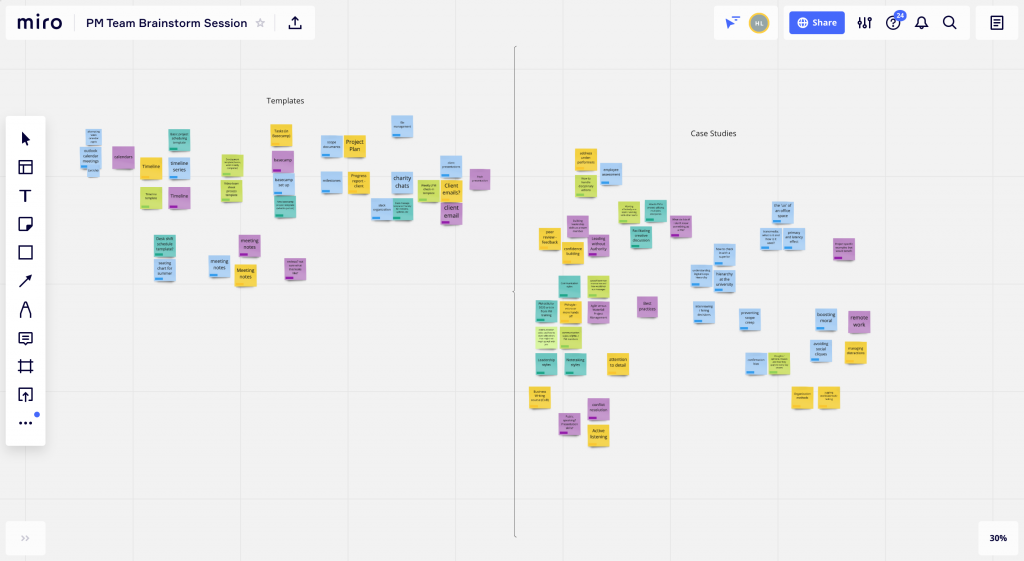
You can conduct a Saturate and Group session remotely as well. The overall process is the same, but instead of sticky notes and a whiteboard, you will use a video conferencing platform like Zoom and collaboration tools like Miro or Whimsical. For online tools, incorporate a quick introduction to the tools at the beginning of your session to ensure all participants feel comfortable using them. In a remote session, it may be tempting for participants to help group the sticky notes during the group part of the session. Make sure that as the proctor, you are the only one grouping them so discussions can still occur.
Reporting a Saturate and Group
At the conclusion of the session, gather all that you have learned from the participants and prepare a report for the project team. Identify key findings and define the next steps for the team. Check out this example report if you need help to get started.
If the Saturate and Group was in person, include pictures of the final grouping of sticky notes. For remote sessions, include a link to the Miro or Whimsical board so readers can further explore the ideas collected.
In the report, you will first need to include a project overview. In this section, you should explain the project, goals and objectives, and the purpose of the brainstorming session.
Next, report on the results. To do so, create a heading for each group of ideas from the session. Give a brief explanation of what was in this group, and what the ideas would mean in context for the project. If possible, provide clear next steps for the team to further develop the project. Repeat this process for every group made. Remember that the review process for reports is as follows:
- JPM
- PM
- Team Lead
- Brandon
Saturate and Group can be an effective way of finding out how participants feel about a certain product or idea. This method can be a great way to get quick results and generate a variety of perspectives. Use the session results to give your team a more defined problem statement, backed by research with users.
Additional Articles:
This article is part of a series:
-
1
Six Thinking Hats Brainstorming

-
2
Saturate and Group
-
3
SCAMPER Brainstorming