Design, Development, and UX Collaboration

Quick Tip!
Designers, developers, and UX-ers make an effective team! Make sure to involve each other early in the process and you will set the project up for success.
Helpful Staff for this Topic


Collaboration is essential for the Corps to provide its valued services. Developers, designers, and UX-ers must work together to ensure a project’s success and allow for effective progress.
Designers Helping Developers
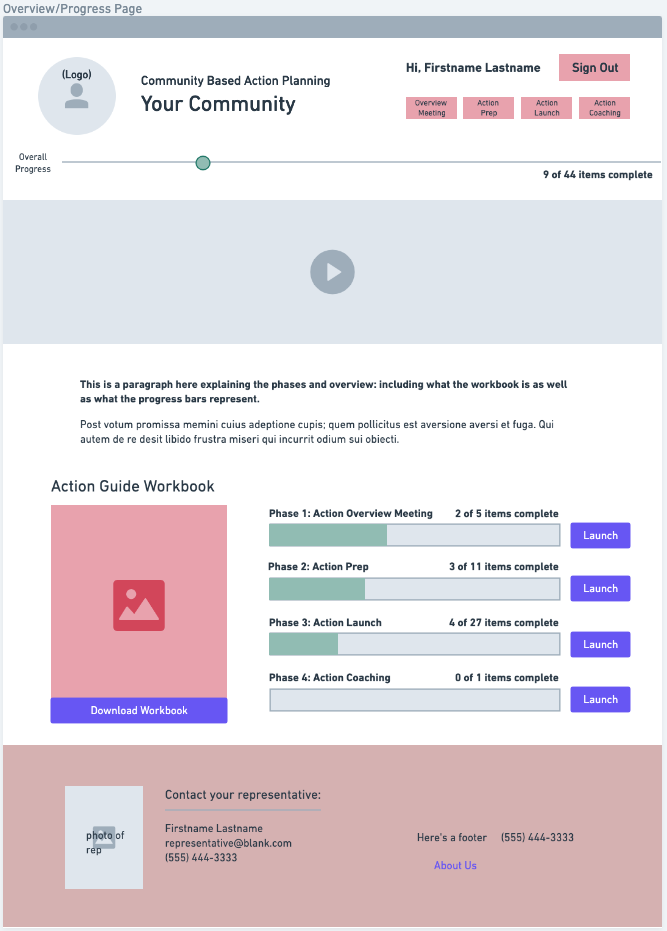
Wireframing
Creating wireframes is often the first task designers and UX-ers are assigned for most website projects. The wireframes show the skeletal structure of the website and describe the basic functionality of each page. It is crucial that developers are included early in this process, because they can offer insights into the feasibility of certain features, as well as their effects on the timeline. This allows for changes to be made quickly, before they become problematic further into the project process. It is also important to involve the UX team in this joint process. Their insights are invaluable and will ensure the wireframes meet the client’s objectives and requirements.
Use Similar Designs
A second step in the planning phase is the identification and reuse of similar components and styles. Not only does this provide a more uniform design, but it allows developers to save time and apply the same logic in multiple places. The Basecamp Dashboard offers an excellent example of this approach.
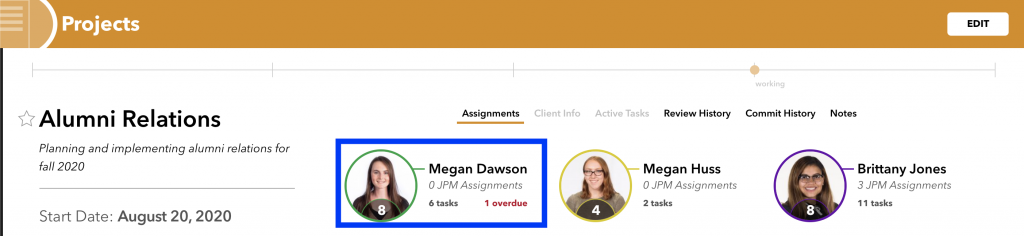
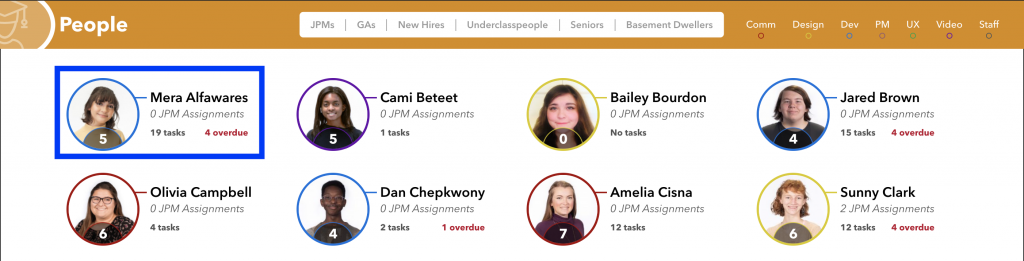

It is important to note that the design does not need to be the same, only similar. The dashboard makes clever use of border colors to give team information, and uses different text depending on task counts and whether the employee is a staff member or student.
There are a few other example questions a designer can ask themselves to help developers build faster by keeping styles similar:
- “Does this button really need to be slightly bigger than the other buttons on the site?” This might apply to heading, and paragraph font sizes as well.
- “Is there an existing design for the site, that can be reused elsewhere?” This could be similar to the person component on Basecamp Dashboard, a background graphic, or a form layout.
Use Proper Git Flow
If a designer works with the codebase, it is important that they use proper git flow. Git flow is how contributors manage the code repository via committing, branching, and merging. Proper git flow allows people to track changes, quickly revert code if something goes wrong, and identifies who worked on which aspects of the project. A designer should review the following guidelines, and if interested in learning more, read the Git Reference Guide and the Pull Request Reference Guide.
- When styling or working on a new page/big section, checkout a new branch and name it feature/[page-name]-styling. This allows others to work off this branch.
- The new code should be solely focused on styling the page specified in the branch.
- Once the code is finished and working properly, it should be merged into the develop branch. This should likely happen via a pull request, so others can review the code.
Developers Helping Designers
Simplify the Project Setup
To help ease new designers and developers into the project, you should aim to make the project setup as seamless as possible, which you can accomplish with a detailed README.md. A Readme file should be located in the project’s root directory, which allows it to be displayed when someone visits the project’s repository via a web client, and provides quick access when viewing the project locally. At a minimum, the Readme should include the following, but can include more as needed:
- A short description of the project
- The minimum steps required to run the project locally
- Commands to install dependencies
- Instructions on how to set up the database
- List of required config files, and how they should be changed
- Procedure for how to run the project
- Links and descriptions of external dependencies
- Third-party APIs
- Libraries
- How to troubleshoot common errors
- List the helpful commands to run if something fails
- Provide the steps to take to fix in the browser (e.g. “If your site suddenly stops updating the styles, run this command to compile the SCSS files…”)
As the project evolves, continue to update the README.md with new information. This could include updates to the set up process, the addition of documentation links for new dependencies, or information for how to fix a common bug. To further help designers, if asked, offer assistance with git flow, or running commands from the terminal to set up the project.
Voice Your Thoughts
The Corps hires individuals for a reason. Developers can offer insights about code complexity and accessibility concerns, and should speak up in meetings. Does an add-more button increase the complexity of the site unnecessarily? Let the team know your concerns as this allows everyone to evaluate what’s needed, or help modify the timeline. Designers and UXers can often change this in wireframes, which will save them time when working on hi-fidelity mockups. Will an animation or process be accessible on mobile? If not, don’t wait until development begins for mobile to speak up – the designers may need more time to come up with the best solution. Be sure to include the User Experience team in this discussion as well. They have received training to identify these issues and will offer key insights that you might have missed.
Oftentimes, updated versions of mockups unknowingly add new features and complexity to the site. When this happens, or when the scope changes during a meeting, give feedback on the feasibility based on the current code structure. This can help the team make better decisions about which features to keep, or allow for time to come up with a better solution. As an example, a design might include unique styling for form validations. These are difficult to change, and often the browser’s styling is sufficient.
Outline the Application States
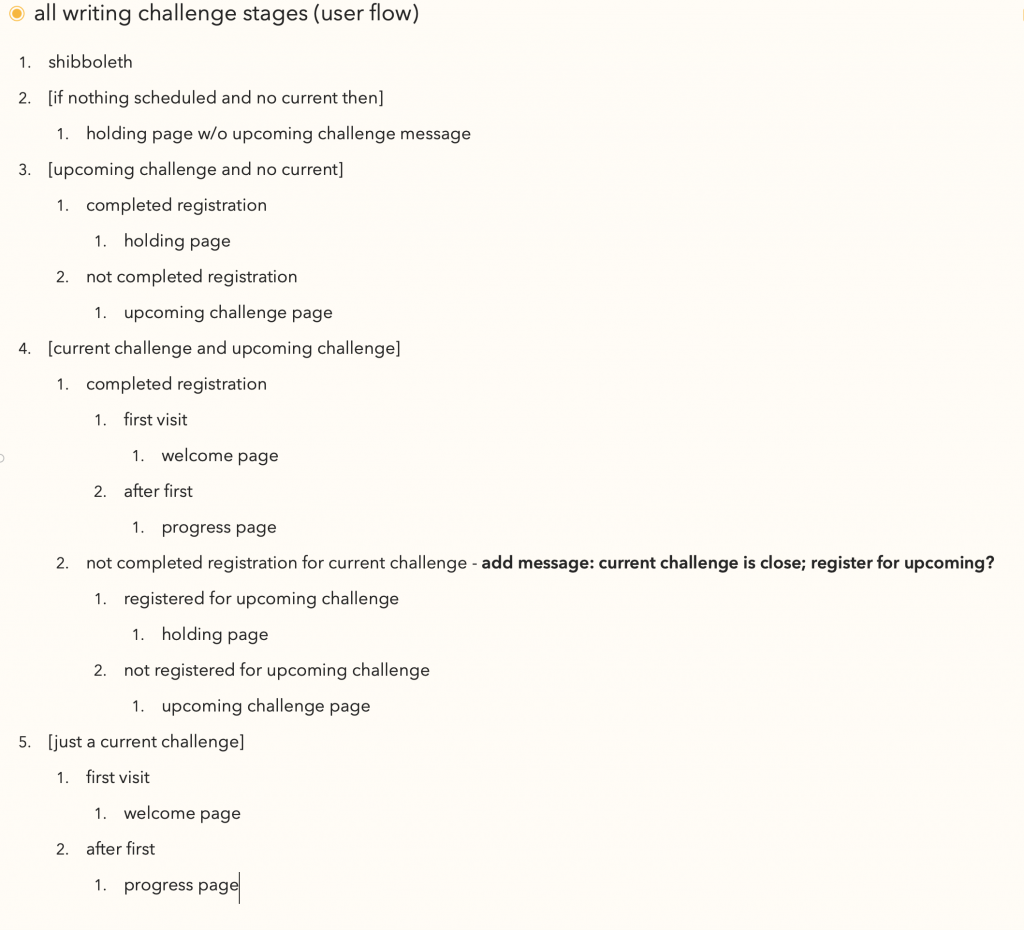
When working on a complex website, there are many times when a page’s content differs depending on the state of the application. For example, a site might display a registration link if the user is not logged in, a different section if they are, and perhaps extra features if the user has admin privileges. A developer will eventually have to build these different pages, thus it is important that they are outlined early, so it is clear what needs to be designed and accounted for.
The Writing Challenge Website offers a complex example of what should be expected. The site’s main page could have a different display depending on whether the user was signed in, their registration status relevant to the challenge, whether they were new to the site, and when the challenge would be occurring. Not only does this highlight the different pages that designers should be working on, but it gives the developers a clear idea of what screen and information should be shown at any given moment.
Conclusion
When developers, designers, and UX-ers work collaboratively, they can create incredible things. Simplifying the project setup and using similar designs will save valuable time early on in the process. By sharing your ideas and insights, you help deliver the best results that the Corps is known for producing.
